UC3 Finished Goods Traceability REST API
Architecture
The desired environment (one that would perfectly replicate a real world scenario) is described below:
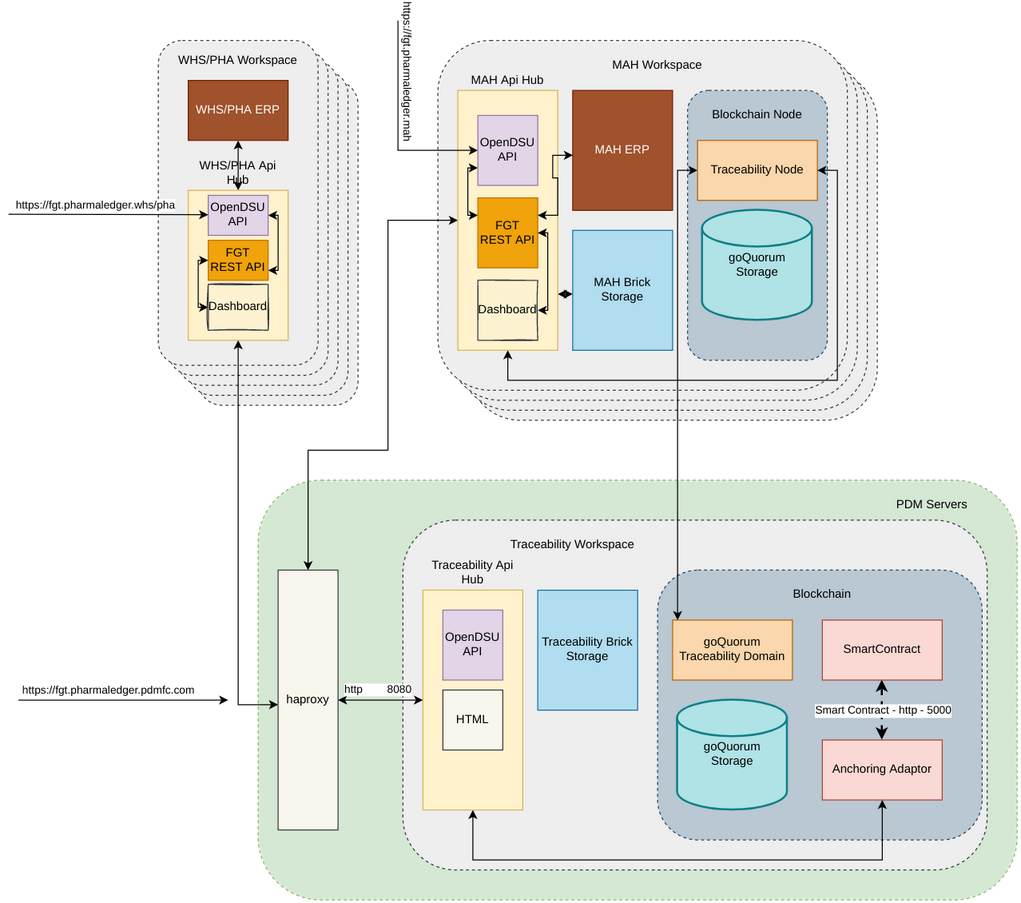
Where apart from the Traceability workspace running the OpenDSU API (Api-hub) and brickstorage for the 'traceability' domain and the initial nodes for the domain blockchain, each other participant would run, in its own environment, the Finished Goods Traceability REST API, connected to its ERP system. Running blockchain nodes for the 'traceability' domain would be optional, but recommended at least for MAHs.
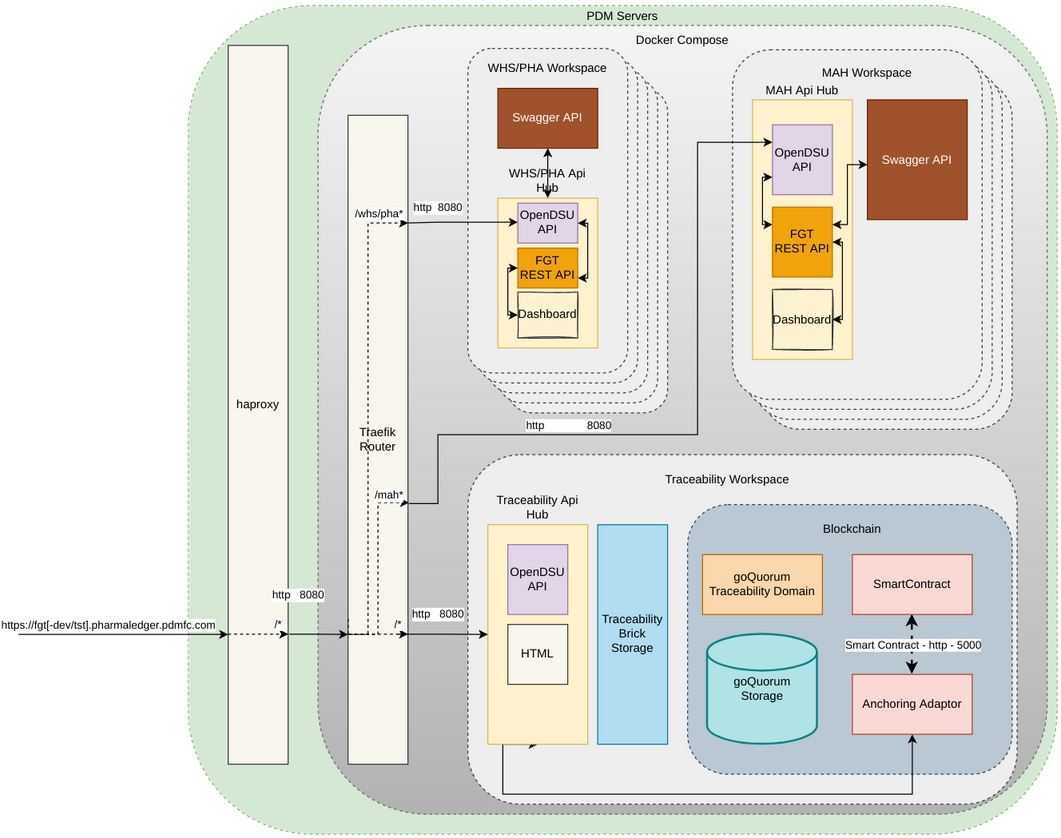
Since this is very hard to put in place at this stage, to simulate this environment and for testing purposes, PDM intends to deploy a test environment, containing all the participants, while providing access to a testing tool (swagger), a viewing tool (initially swagger, but a GUI at a later stage) and exterior access to the REST API for integration testing:
Installation
Each workspace is configured to run, along its Api-hub, one instance of each wallet type's REST API.
To do so run (after the initial setup in the traceability workspace):
- For MAH:
npm run run-mah - For WHS:
npm run run-whs - For PHA:
npm run run-pha
for each of these wallets, the credentials must be stored, in json format, under:
./fgt-api/config/fgt-[mah|whs|pha]-wallet/credentials.json
the provided format should match (the id is mandatory, all others are optional):
{
  "name": {
    "secret": "PDM the MAH",
    "public": true
  },
  "id": {
    "secret": "MAH324353426",
    "public": true
  },
  "email": {
    "secret": "mah@mah.pharmaledger.com",
    "public": true
  },
  "address": {
    "public": true,
    "secret": "New York, USA"
  },
  "pass": {
    "secret": "This1sSuchAS3curePassw0rd"
  },
  "passrepeat": {
    "secret": "This1sSuchAS3curePassw0rd"
  }
}
Swagger API DOC
Running server
On fgt-api folder, run npm run run-swagger. Navigate to http://localhost:3009.
Command Line Arguments
port
swagger server listening port
- argument: port
- env variable name: SWAGGER_PORT
- default: 3009
participant
.yml file name
- argument: participant
- env variable name: SWAGGER_PARTICIPANT
- default: MAH
path
folder path to .yml file to load swagger UI
- argument: path
- env variable name: SWAGGER_PATH
- default: ./docs
server
API url that swagger requests will be done
- argument: server
- env variable name: SWAGGER_SERVER
- default: http://localhost:8081/traceability
Example
npm run run-swagger -- --port=3030 --participant=PHA
Deployment
Test Environment
Go to ./docker/api and run
docker-compose build --no-cache
This will build all the necessary images (and will take some time)
Followed by
docker-compose up
After this command executes you can go to your browser and:
- localhost:8080/dashboard/ - Here you can see all the routing rules necessary to simulate the environment
- localhost:8080/ - Here you'll find Pharmaledger's Traceability Use Case Entry Page with access to the dossier Explorer (and the possibility to create new instances of the (deprecated) UI based wallets)
- For each participant, under ${ParticipantId}.fgt.pharmaledger.pdmfc.com:
- .../ - The participants Entry Page (Should be the same as the Use Case's);
- .../api/** - The route to the Participant's REST API;
- .../swagger - The Participant's Swagger Dashboard, to replace the ERP's and allow partners to interact with the REST API;
- .../dashboard - A Graphical interface to consume the api and display relevant information/metrics